Loading New Mods
This page will cover the typical way to load a new mod into ONB, assuming you already have one. Maybe a friend has sent you a singular mod over Discord and you need to get it loaded.
This is the barebones, original process, which is streamlined if you download from one of the mod websites instead, covered in another section. Still, knowing how mods are added without that help can be useful for situations like the above.
One Mod
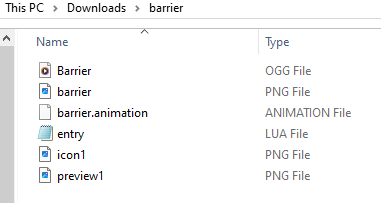
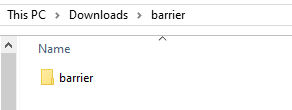
A singular mod file will be one ZIP file, the insides of which contain the
mod files. It is NOT a ZIP file that contains a folder that contains the
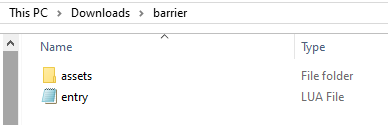
mod files. It must have an entry.lua in the uppermost directory.
Good, actual mod:
Bad, will not load (barrier folder inside barrier.zip, no entry.lua here):
Good, actual mod (entry.lua is at the top directory):
Extracting
Do not extract individual mod packages on your own. ONB will do it in a special way on boot.
Zipping
If you want to send your friend or someone else your mod, you might feel like zipping up the folder and sending that. Do not do this. Instead, send the ZIP file that was either generated or updated by ONB on the latest boot. This preserves the MD5 hash, which helps two clients identify a mod owned by both of them.
Mods Folder
You'll want to get your mod over to the mods folder.
Starting from your ONB folder, go into the resources folder, then into the
mods folder.
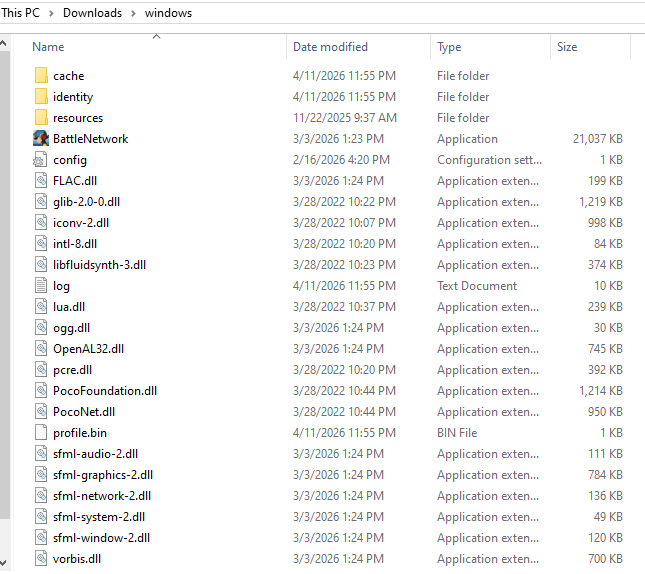
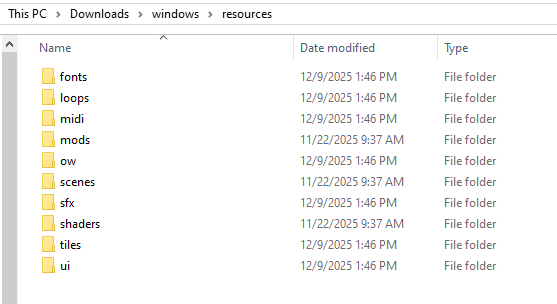
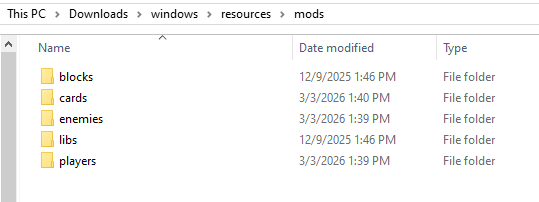
You should know what type of mod you're trying to load, so put the ZIP file into the corresponding mod folder. Then, launch ONB and the mod should load.
If you don't know what type of mod you have, you can usually identify it from
the contents of the entry.lua.
- Check the package ID. Modders usually include the type of mod in the ID.
You can find this in the
package_initfunction, usually as the first line. It's the text on the line that hasdeclare_package_idin it - Check for identifying functions. If you see
function card_create_actionsomewhere, it's probably acardmod. If you seefunction player_init, it's probably aplayermod. Withfunction package_build, it should be amob, and if you see anything setting a shape and a mutator, it should be ablock. If none of those are around,libsis a safe bet.
If you can't figure it out and put it in the wrong folder, the mod will fail to load, which you can see told to you as an error in the black console window that opens with ONB. You should make sure to fully remove the mod from the incorrect folder before trying another folder.